Adaptive Dock
AvailableA Mac Dock that keeps up with you.
Adaptive Dock reorganizes your Mac's Dock around the apps you actually use. The apps you use most move up front, the ones you've stopped using step aside, and every change can be undone in one click.
- Platform
- macOS
- Category
- Utilities
- Price
- $9.99 one-time · 1 Mac
- Requires
- macOS 14 or later · Apple silicon (M1 or newer)
What it does
Why people use Adaptive Dock
Promotes what you use
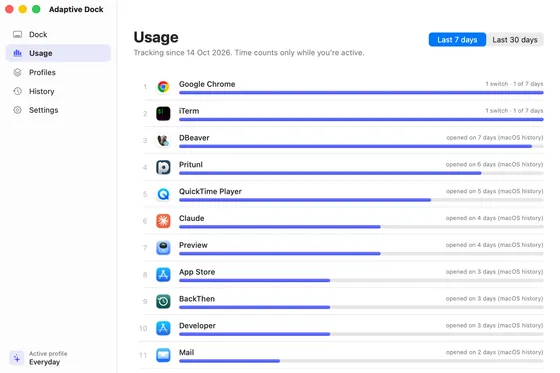
Ranks your apps by the last 7 or 30 days and moves the busiest ones up front. Works from day one, using macOS's own record of which days you opened each app.
Profiles for every mode
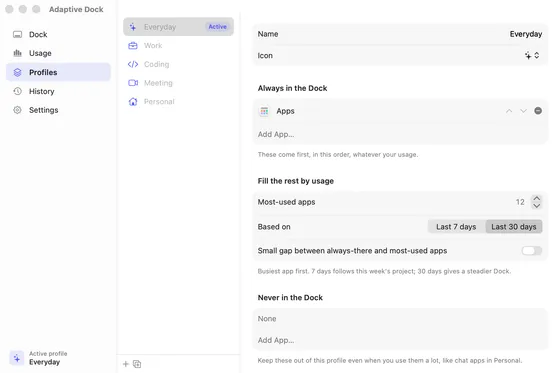
Everyday, Work, Coding, Meeting and Personal, pre-filled from the apps on your Mac. Choose apps that always stay, apps that never appear, and how many most-used slots to fill.
Switch from the menu bar
Adaptive Dock lives in the menu bar. Pick a profile and your Dock changes to match.
One-click restore
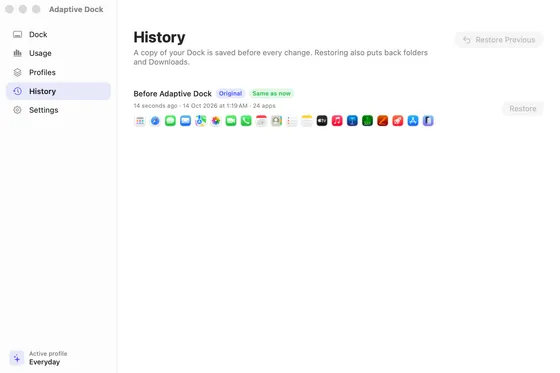
Your Dock is saved before every change. The very first save, from before Adaptive Dock, is kept forever. Restore Previous is always one click away.
Automatic updates, politely
Off, hourly, every 4 hours or daily. It waits until you stop typing or clicking for a moment, and pauses if you rearrange the Dock yourself.
Only touches your apps
Folders, Downloads and your Dock settings are left alone. Apps already in your Dock keep their exact tiles.
Install guide
Get started in five minutes
Download and install
Download Adaptive Dock (2 MB), open the DMG and drag Adaptive Dock into your Applications folder.
Download for MacOpen it the first time
Adaptive Dock isn't notarized by Apple yet, so macOS stops the first launch with a message that it couldn't verify the app. Click Done, then open System Settings → Privacy & Security, scroll down to Security and click Open Anyway next to Adaptive Dock. Confirm with your password or Touch ID and click Open. You only do this once.
See what it would do, free
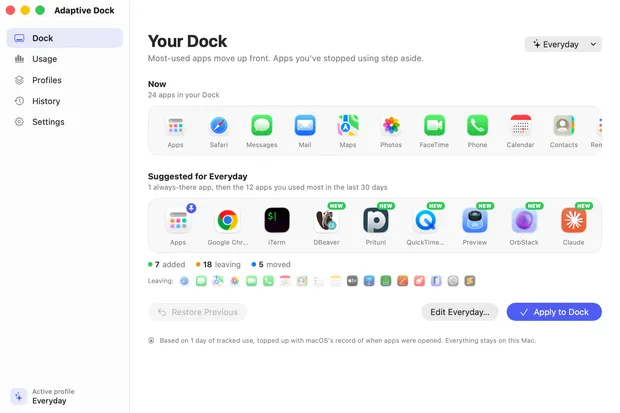
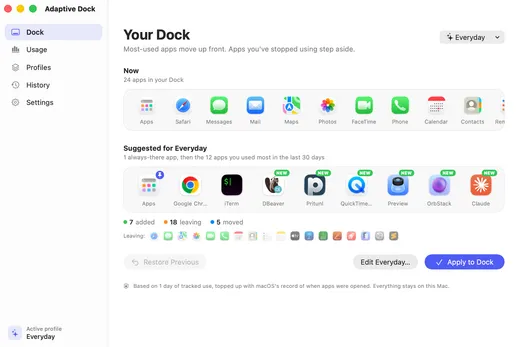
Adaptive Dock appears in your menu bar and walks you through a short setup. It shows your current Dock next to the one it suggests, so you can see the result before you pay.
Buy and activate
Buy a licence for $9.99. Your licence key arrives by email straight after checkout. Paste it into the last setup step, or later in Settings → Licence, and click Activate.
Buy Adaptive Dock · $9.99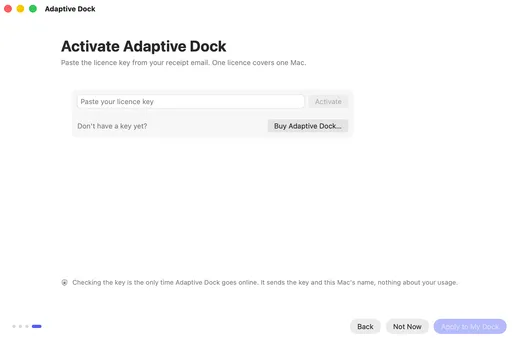
Apply to your Dock
Pick a profile and click Apply to My Dock. The Dock blinks once while it reloads; your open apps and windows are not affected. Turn on automatic updates in Settings to keep it in step with your usage.
Want your old Dock back?
Open History and restore “Before Adaptive Dock”, or choose Restore Previous Dock from the menu bar.
Moving to a new Mac?
A licence covers one Mac. On the old Mac open Settings → Licence → Deactivate on This Mac, then activate the same key on the new one.
Uninstalling
Restore “Before Adaptive Dock” from History first if you want your original Dock, quit Adaptive Dock from the menu bar, then drag it to the Trash. Its data is in ~/Library/Application Support/Adaptive Dock.
Lost your licence key?
It's in the receipt email from Dodo Payments, sent to the address you used at checkout. Still stuck? Message me on Instagram, @shiponfriday.
Your data
Usage is recorded only on your Mac (which app is in front and for how long), never window titles, keystrokes or screenshots. The only network call checks your licence key with Dodo Payments, sending the key and your Mac's name. No account, no analytics.
Adaptive Dock learns from the way you actually work. Download it free to see the Dock it suggests from your own usage, then buy a licence when you want it to rearrange your Dock for you.
Payments are handled by Dodo Payments, which also emails your receipt and licence key.
Adaptive Dock questions
How do I automatically organize my Mac Dock?
Adaptive Dock ranks your apps by how much you actually used them in the last 7 or 30 days and rewrites the Dock so your most-used apps come first. Turn on automatic updates and it keeps the Dock in step with your usage, waiting until you're idle so the Dock never moves under your cursor.
Can I try it before buying?
Yes, in a way. There's no time-limited trial, but you can download it for free and see the Dock it suggests from your own usage. Buying a licence unlocks applying it to your Dock.
Is it a subscription?
No. It's a one-time purchase of $9.99 for one Mac.
Will it mess up my Dock?
It saves your Dock before every change and keeps the original forever, so you can always go back in one click. It only rearranges apps; folders, Downloads and Dock settings are not touched.
Does it work on Intel Macs?
Not yet. Adaptive Dock needs a Mac with Apple silicon (M1 or newer) running macOS 14 Sonoma or later.
Why does macOS warn me when I open it?
Adaptive Dock isn't notarized by Apple yet, so macOS asks you to confirm the first launch. Click Done, then System Settings → Privacy & Security → Open Anyway. You only do this once.
Does Adaptive Dock collect my data?
No. It records which app is in front and for how long, only on your Mac. The only time it goes online is to check your licence key with Dodo Payments, sending just the key and your Mac's name.